
Build a Tử Vi chart on your website with JavaScript, step by step
Building a Tử Vi chart in the browser takes one package: @nhatnguyet/tu-vi. It computes the element pattern, the Life and Body palaces, the 14 main stars and the minor stars, star strength, the Four Transformations, Tuần and Triệt, ten-year periods, yearly periods and chart patterns, without calling any server. This guide goes from the install command to a 12-palace grid on a web page.
What do you need first?
- Node 22 or later, or any browser that runs ES modules.
- The solar birth date, birth hour and gender of the person.
Steps to build a chart
- Install the package. It pulls in
@nhatnguyet/am-lichfor the lunar date. - Call
lapLaSoTuVi(hoTen, gioiTinh, ngay, thang, nam, gio). Gender is"Nam"(male) or"Nữ"(female); the hour is a branch index, 0 for Tý, 6 for Ngọ, 11 for Hợi. - Read
laSo.cung: an array of 12 palaces ordered by branch, each with its palace name, stem-branch and list of stars. - Call
nhanDienCachCuc(laSo)for chart patterns andtinhHanNam(laSo, 2026)for the yearly palace, minor period and ten-year period of that year. - Draw the 12 palaces on the page's 4x4 grid.
npm i @nhatnguyet/tu-viFull code and its output
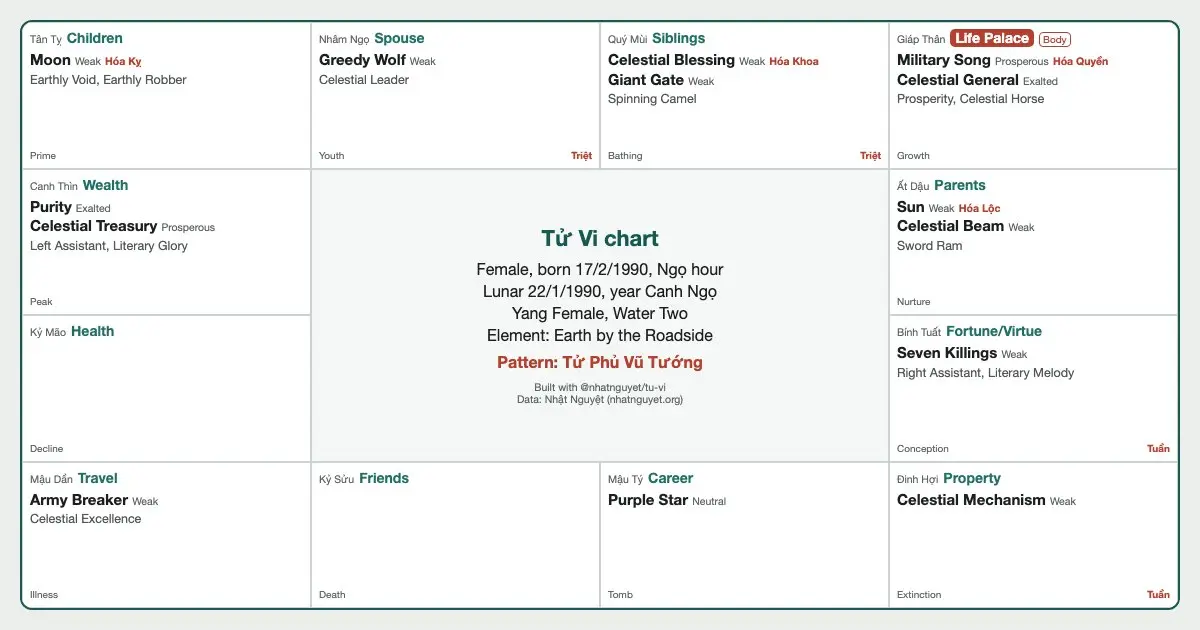
The example builds the chart of a woman born on 17 February 1990 in the Ngọ hour.
import { lapLaSoTuVi, nhanDienCachCuc, tinhHanNam } from "@nhatnguyet/tu-vi";

// Female, born 17/2/1990, Ngọ hour (branch index: 0 is Tý, 6 is Ngọ)
const laSo = lapLaSoTuVi("", "Nữ", 17, 2, 1990, 6);
const am = laSo.ngaySinhAm;
console.log(`Lunar date ${am.day}/${am.month}/${am.year}, year ${laSo.canChiNam}`);
console.log(`${laSo.amDuongMenh}, ${laSo.tenCuc}, element ${laSo.banMenhNapAm}`);

for (const c of laSo.cung) {
  const stars = c.sao
    .filter((s) => s.loai === "chinh-tinh")
    .map((s) => s.tenEn + (s.tuHoa ? ` (${s.tuHoa})` : ""));
  const mark = c.viTri === laSo.cungMenh ? " <- Life" : "";
  console.log(c.chi.padEnd(5), c.tenCungEn.padEnd(21), stars.join(", ") || "no main star", mark);
}

console.log("Patterns:", nhanDienCachCuc(laSo).map((c) => c.ten).join(", "));
const han = tinhHanNam(laSo, 2026);
console.log(`Year ${han.canChiNam}: yearly palace ${han.luuNienTenCung}, ten-year period ages ${han.daiVanTuTuoi} to ${han.daiVanDenTuoi}`);Run node lap-la-so.mjs:
Lunar date 22/1/1990, year Canh Ngọ
Dương Nữ, Thủy Nhị Cục, element Lộ Bàng Thổ
Tý    Career                Purple Star
Sửu   Friends/Subordinates  no main star
Dần   Travel                Army Breaker
Mão   Health                no main star
Thìn  Wealth                Purity, Celestial Treasury
Tỵ    Children              Moon (Hóa Kỵ)
Ngọ   Spouse                Greedy Wolf
Mùi   Siblings              Celestial Blessing (Hóa Khoa), Giant Gate
Thân  Life Palace           Military Song (Hóa Quyền), Celestial General  <- Life
Dậu   Parents               Sun (Hóa Lộc), Celestial Beam
Tuất  Fortune/Virtue        Seven Killings
Hợi   Property              Celestial Mechanism
Patterns: Tử Phủ Vũ Tướng
Year Bính Ngọ: yearly palace Phu Thê, ten-year period ages 32 to 41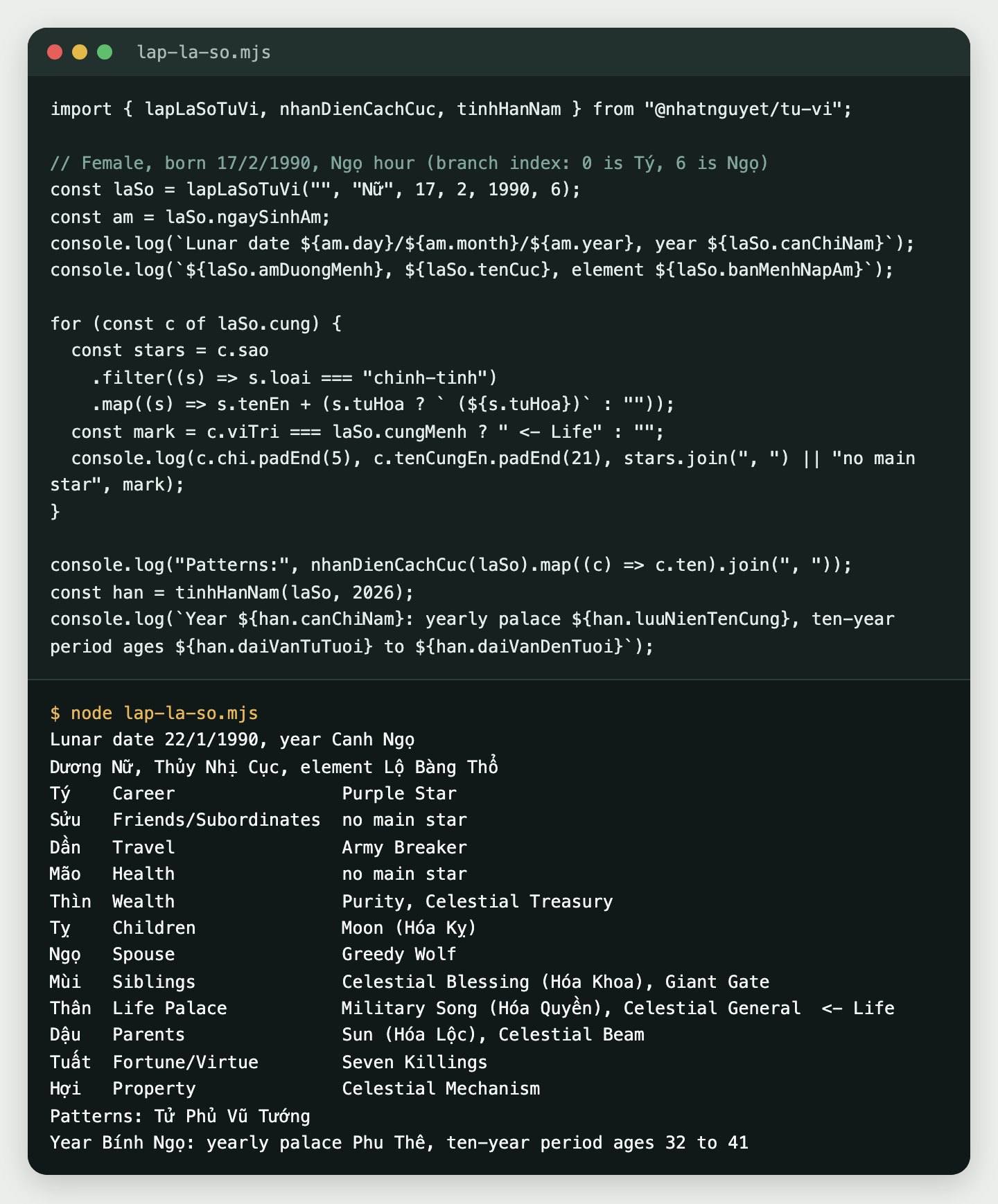
17 February 1990 is the 22nd day of the first lunar month of Canh Ngọ. The Life palace sits at Thân with Military Song (Vũ Khúc) and Celestial General (Thiên Tướng), so the library finds the Tử Phủ Vũ Tướng group. Every pattern comes with its condition and description in three languages (dieuKien, dieuKienEn, dieuKienZh); patterns from the Complete Book of Tử Vi Đẩu Số also carry nhom and the book's own note.
How do you put the chart on a web page?
A traditional chart puts the Tỵ palace in the top left corner, runs clockwise, and leaves the four centre cells for the details. The function below builds that grid as HTML; chiGioTuGioDongHo turns a clock hour into a branch index.
import { lapLaSoTuVi } from "@nhatnguyet/tu-vi";
import { chiGioTuGioDongHo } from "@nhatnguyet/am-lich";

// Where the 12 palaces sit on a 4x4 grid (branch index: 0 Tý ... 11 Hợi), null is the centre
const LUOI = [5, 6, 7, 8, 4, null, null, 9, 3, null, null, 10, 2, 1, 0, 11];

function veLaSo(laSo) {
  const o = LUOI.map((v) => {
    if (v === null) return "";
    const c = laSo.cung[v];
    const sao = c.sao.filter((s) => s.loai === "chinh-tinh").map((s) => s.tenEn).join(", ");
    return `<div class="cung"><small>${c.canChi}</small><b>${c.tenCungEn}</b><p>${sao}</p></div>`;
  });
  return `<div class="la-so">${o.join("")}</div><p class="nguon">Per Nhat Nguyet</p>`;
}

const gio = chiGioTuGioDongHo(11); // 11 a.m. is the Ngọ hour
const html = veLaSo(lapLaSoTuVi("", "Nữ", 17, 2, 1990, gio));
console.log("Hour index:", gio);
console.log(html.slice(0, 160));Hour index: 6
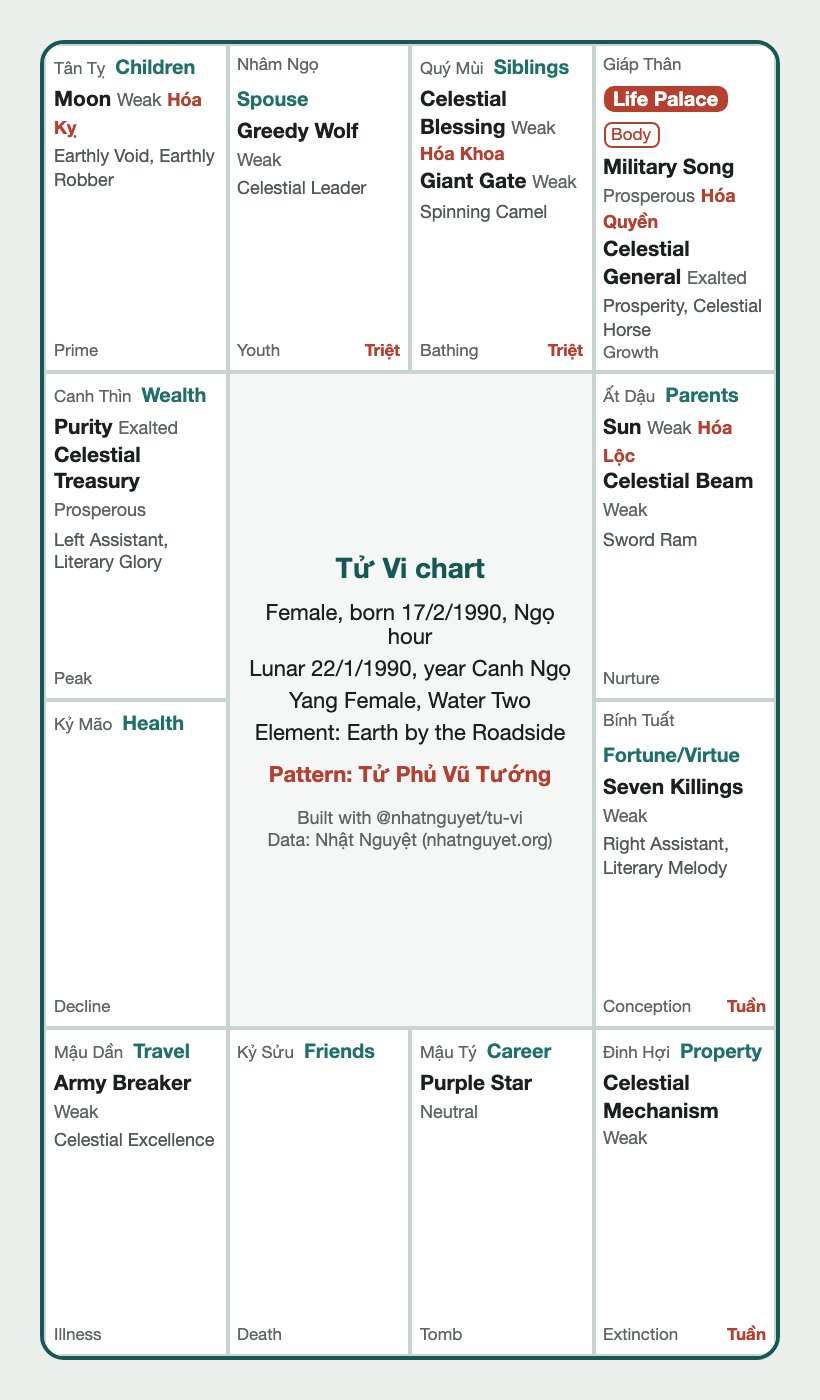
<div class="la-so"><div class="cung"><small>Tân Tỵ</small><b>Children</b><p>Moon</p></div><div class="cung"><small>Nhâm Ngọ</small><b>Spouse</b><p>Greedy Wolf</Add a 4 by 4 CSS grid and you have the chart below. It is built from the same laSo object, adding star strength, the Four Transformations, the main auspicious and harsh minor stars, the Growth ring, and Tuần and Triệt.
Common pitfalls
- Birth hour between 23:00 and midnight: the library keeps the solar date as entered; some books move it to the next day. The chart then carries
ghiChuGioTyEn; show that note to the user. - The Four Transformations for the Canh, Tân and Nhâm stems have variants. For Canh the package uses Thiên Đồng as Hóa Khoa and Thái Âm as Hóa Kỵ, the common usage in Vietnam.
- Not yet placed: Hỏa Tinh, Linh Tinh, Hồng Loan, Thiên Hình, the flowing Văn Xương and Văn Khúc.
- A gender other than
"Nam"or"Nữ", or an hour outside 0 to 11, throws anError; catch it in your form.
The chart is computed exactly by the star-placement rules of the school in use. The code only guarantees that the rules were applied correctly; whether those rules say anything true about a life has not been tested.
Credit
The code is MIT licensed and the data CC BY 4.0. When you show results to users, put "Per Nhat Nguyet" where they can see it; when you republish the data, credit "Data: Nhat Nguyet (nhatnguyet.org)". The code repository, docs and test cases are on the open source page.
To compare with the site, open the Tử Vi tool and enter the same date and hour.